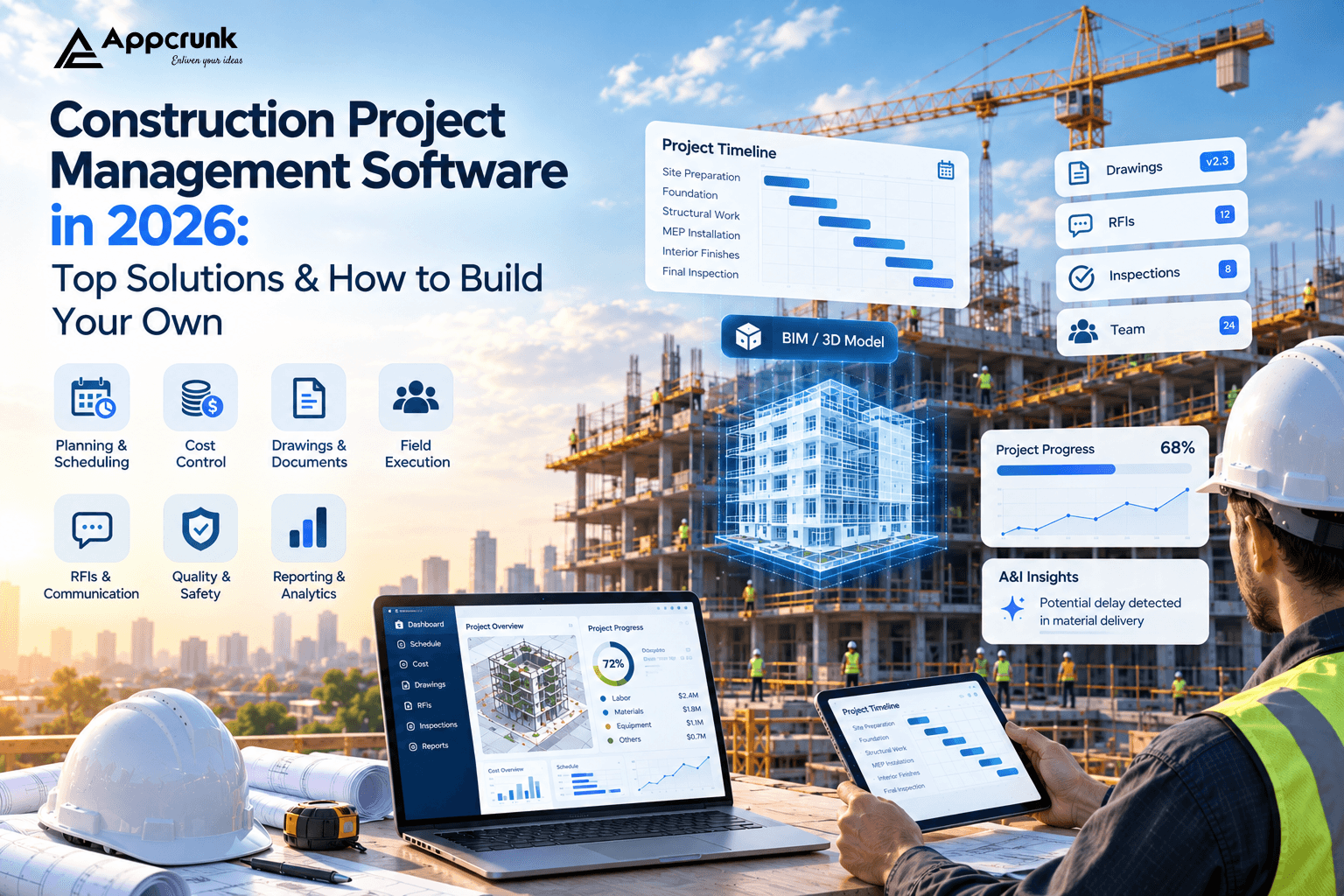
Ask any site manager what keeps projects late and over budget, and the answer is rarely a lack of skill. It is alack of shared, current information. Drawings change on Monday but the crew builds from the old set on Tuesday. A subcontractor's invoice arrives with no link to the approved change order. A safety issue is spotted, photographed, and lost in a group chat.
Construction project management software exists to close those gaps. It puts schedules, budgets, drawings, RFIs, inspections, and people into one system of record that the office and the field both trust.
The market reflects how quickly the industry is digitizing. Mordor Intelligence estimates the construction management software market at about USD 11.58 billion in 2026, growing to roughly USD 17.81 billion by 2031 at a CAGR of around 9%. (Analyst estimates vary by how they define the category, but they all point the same direction: up.)
That growth creates two decisions for a construction business or a software founder:
1. Which ready-made platform should we adopt?
2. Does it make more sense to build our own?
This guide answers both. You will see the leading solutions in 2026, then a complete roadmap to build your own platform, covering process, features, AI, 3D/BIM capabilities, tech stack, cost, and monetization.
What Is Construction Project Management Software and How Does It Work?
Construction project management software is a digital platform that helps contractors, owners, developers, architects, and subcontractors plan, coordinate, and control building projects from preconstruction to handover.
Unlike a generic task tool, it is built around how construction actually works: phased schedules, drawing revisions, contract-driven costs, regulated safety and quality checks, and many companies collaborating on one asset.
A capable platform typically covers:
• Planning and scheduling, including task dependencies and critical-path tracking
• Cost control, including budgets, change orders, and cash flow
• Documents and drawings, with version control
• Field execution, including daily logs, punch lists, inspections, and photos
• Communication, through RFIs, submittals, and approvals
• Reporting, giving owners and executives a live view of progress and risk
The real value is not any single module. It is that all of them share one source of truth.
How Does Construction Project Management Software Work?
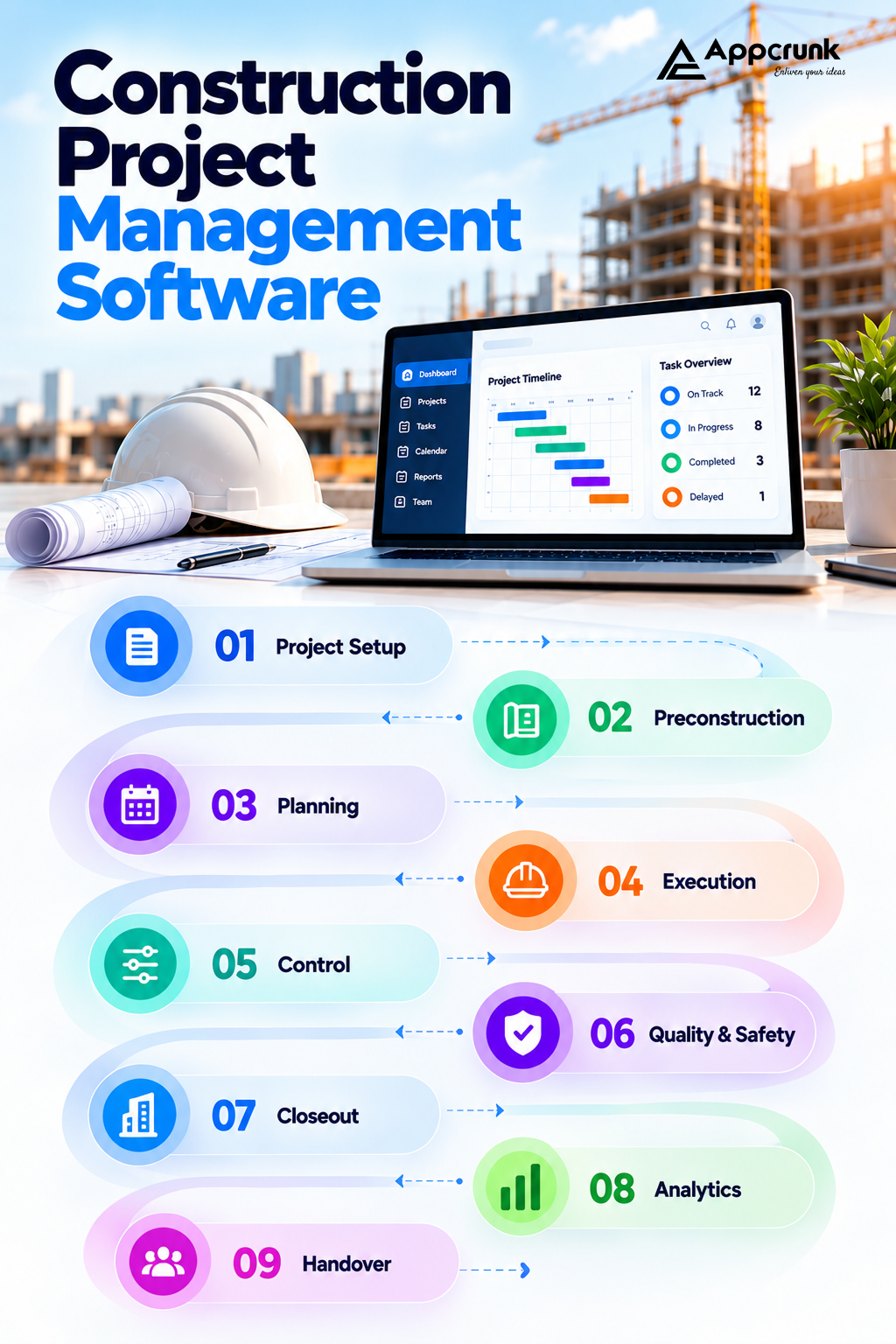
Behind the interface, the workflow follows the life of a project:
1. Project setup. An admin creates the project, defines the phases, budget, and team, and assigns roles and permissions.
2. Preconstruction. Estimates, bids, contracts, and drawings are uploaded and organized. Subcontractors are invited to the project.
3. Planning. A schedule is built with milestones, dependencies, resources, and material lead times.
4. Execution. Field teams use mobile apps to log daily progress, capture photos, raise issues, complete checklists, and submit RFIs. This works even when connectivity is poor, and the data syncs when the device is back online.
5. Control. Progress is compared against schedule and budget. Change orders, approvals, and payment applications flow through defined workflows.
6. Quality and safety. Inspections, incident reports, and compliance records are captured against specific locations or model elements.
7. Closeout. As-built documents, warranties, and handover packages are compiled and delivered to the owner.
8. Analytics. Data from every stage feeds dashboards that show delays, cost overruns, and risk before they become crises. Every step depends on the same thing: the right person seeing the right version of the truth at the right time.
Top Construction Project Management Solutions in 2026
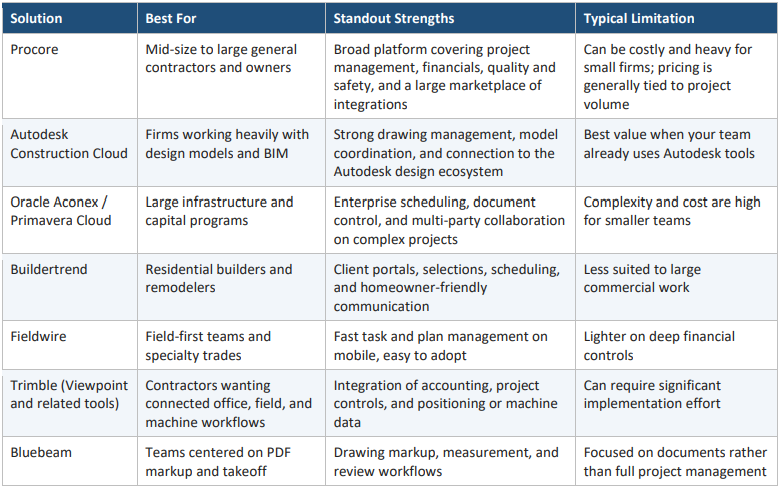
Before deciding to build, it helps to know what is already available. The platforms below are widely used across the industry. Feature sets and pricing change often, so confirm current details with each vendor before making a decision.
Off-the-Shelf vs. Custom: Which Is Right for You?
Ready-made platforms are the right call when your workflows are standard and you want to be productive quickly. Building your own starts to make sense when:
• Your workflow is a competitive advantage, such as a specialized trade, modular or prefabricated construction, or a unique approval chain.
• You need to own your data for analytics, AI training, or compliance.
• Licensing costs scale badly. Per-user or per-project fees can climb quickly across hundreds of projects.
• You want to sell the software, turning an internal tool into a SaaS product for your niche.
• Integration needs are unusual, such as legacy ERP, local payment systems, government portals, or IoT equipment.
Many companies take a hybrid path: keep a market platform for standard needs and build custom modules or a companion app where their process is different.
7 Types of Construction Software Your Platform Can Support
"Construction software" is not one product. Deciding which type you are building shapes your architecture, your users, and your revenue model.
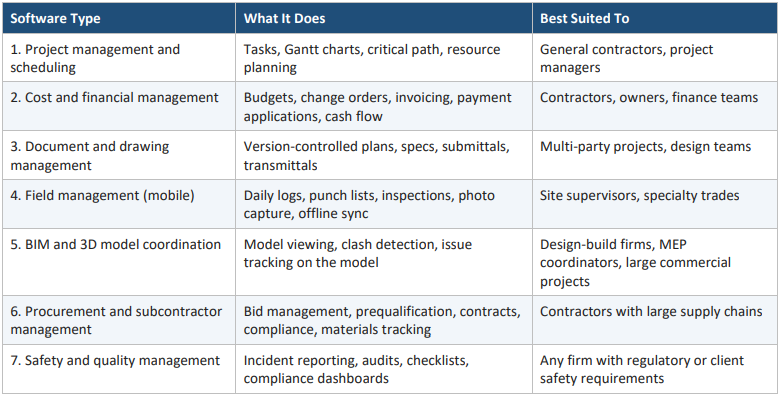
Most successful platforms launch with one or two of these and expand only after users adopt the core. A field-management app with excellent offline sync, for example, can win a market before you ever build a full accounting module.
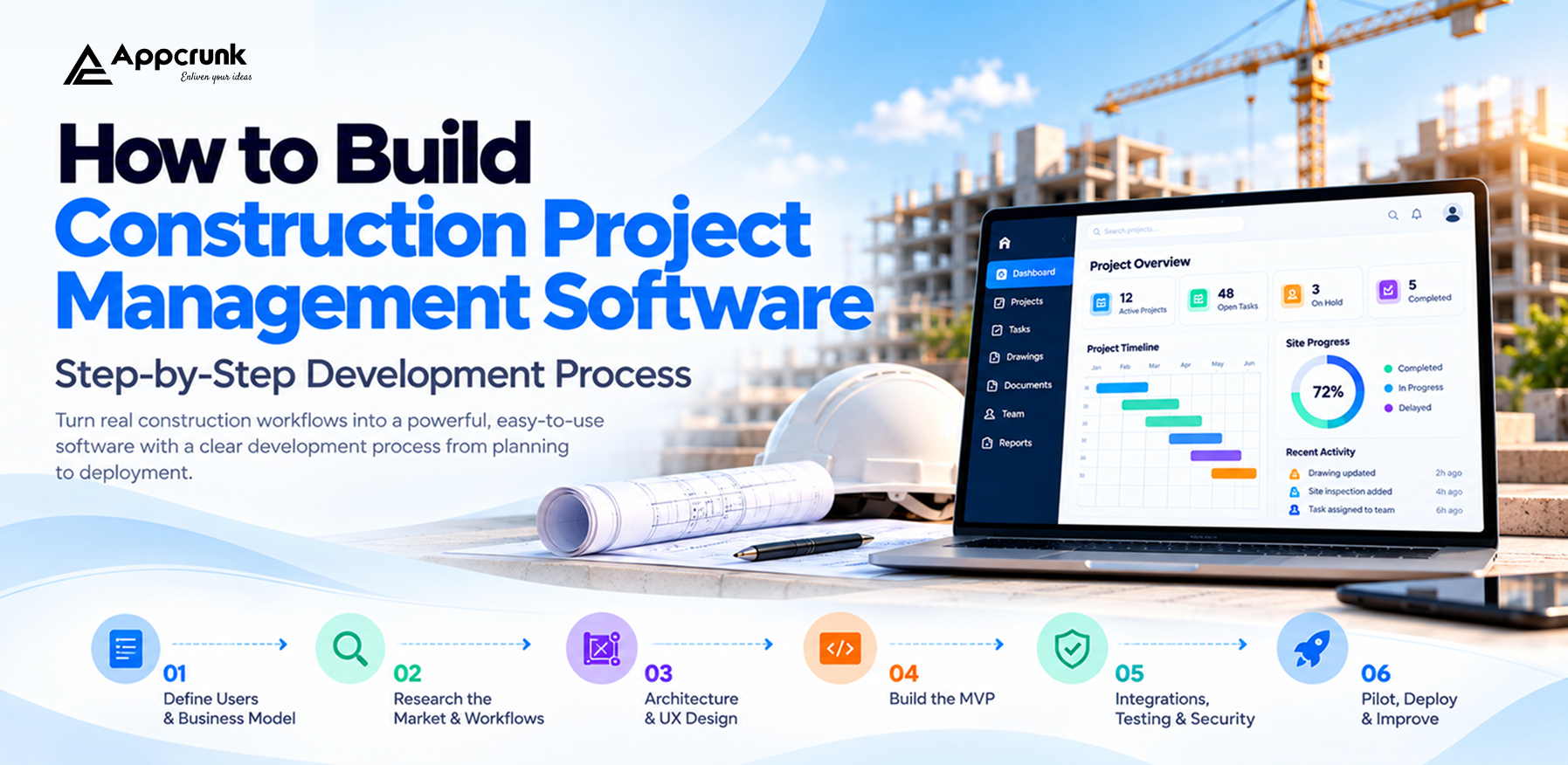
How to Build Construction Project Management Software: Step-by-Step Development Process
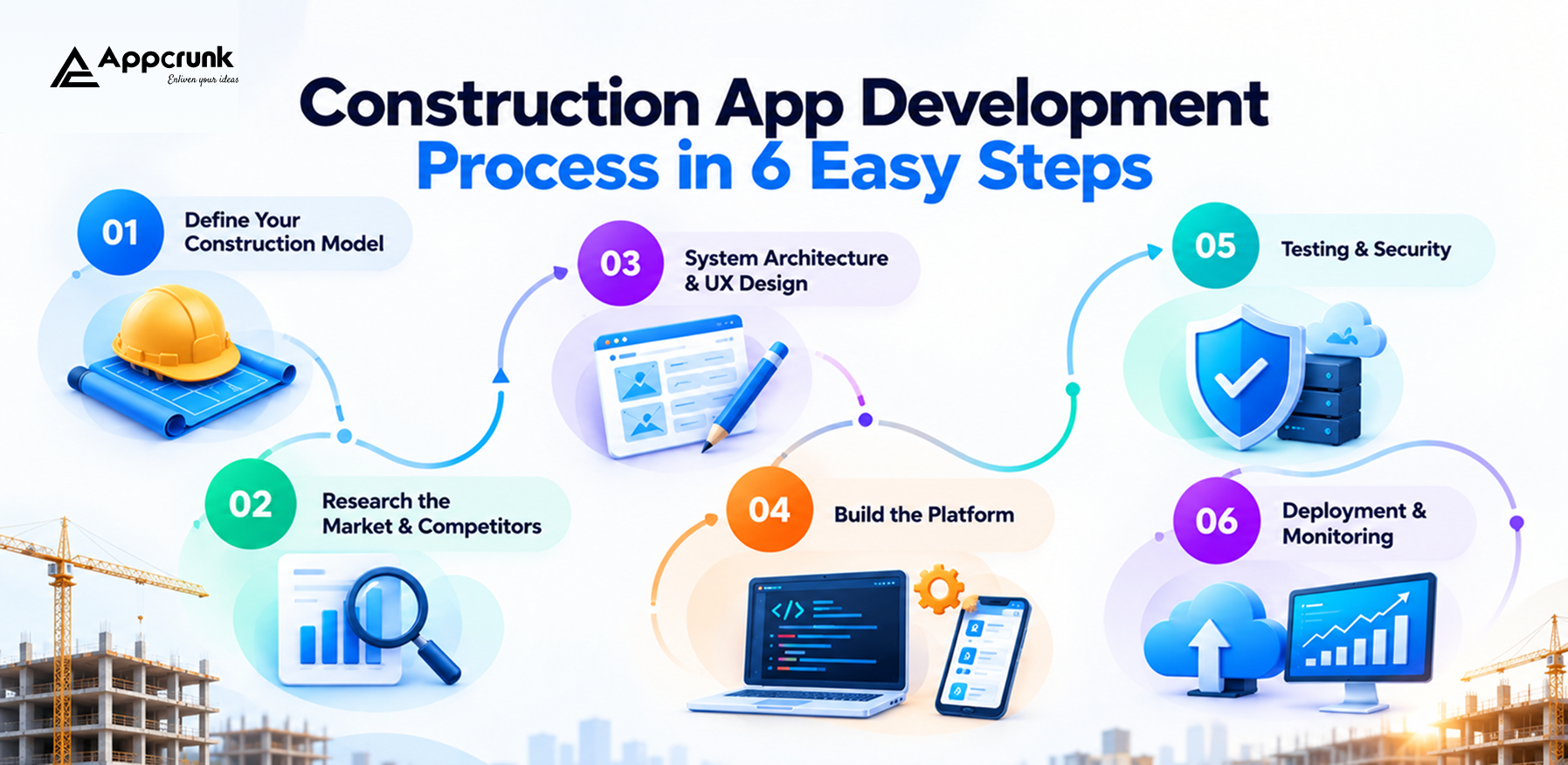
Construction software has to work in conditions that ordinary business apps never face: basements without signal, dusty tablets, gloved hands, and thousands of large drawing files. A disciplined process is what separates a tool crews adopt from one they ignore.
Step 1: Define Your Users, Niche, and Business Model
Start by deciding who this is for and what problem it solves first. A residential remodeler, a civil contractor, and a property developer all need different workflows.
Define:
• Target segment (residential, commercial, infrastructure, specialty trade)
• Primary users (owner, project manager, site engineer, subcontractor, client)
• The single workflow you will make dramatically better at launch
• Internal tool or commercial SaaS product
• Compliance and regional requirements
Step 2: Research the Market and Map Real Workflows
Study existing platforms and, more importantly, shadow real projects. Sit with site managers and see where information breaks down. Look at where teams still rely on spreadsheets, WhatsApp groups, and paper. Those manual workarounds are your product roadmap.
Step 3: Architecture and UX Blueprinting
Plan how the system will handle multi-tenant data, role-based access, large files, offline mode, and integrations. In parallel, design interfaces around the real user: a site supervisor needs big touch targets and three-tap logging, while an executive needs a clear dashboard. Decide early how you will treat drawings and 3D models, because that choice affects storage, rendering, and performance across the whole platform.
Step 4: Build an MVP
Develop the core modules first. A typical MVP includes authentication and roles, project setup, task and schedule tracking, document management, a field app with daily logs and issues, and basic reporting. Build the offline-first sync layer from day one. Retrofitting it later is far more expensive.
Step 5: Integrations, Testing, and Security
Connect accounting systems, e-signature, storage, maps, and notification services. Then test under realistic conditions: poor connectivity, large drawing sets, hundreds of simultaneous users, and conflicting edits made offline.
Security testing is essential because you will hold contracts, financial data, and site information.
Step 6: Pilot, Deploy, and Improve
Roll out to one live project or a friendly customer first. Gather feedback, watch adoption, and fix friction before scaling. After launch, monitor performance, sync errors, and usage patterns, and release improvements in short cycles.
Adoption is the true success metric. If the crew does not use it, the data is not there, and the software delivers nothing.
Core Features Required for a High-Performing Construction Platform
1. Role-Based Access and Multi-Company Collaboration
Owners, contractors, subcontractors, and consultants all need access, but not to the same information. Granular permissions let each party see what they should and nothing more.
2. Project Scheduling and Progress Tracking
Interactive Gantt charts, milestones, dependencies, baselines, and look-ahead schedules help teams plan. Progress updates from the field should feed the schedule automatically.
3. Budgeting, Cost Control, and Change Orders
Track committed cost, actual cost, and forecast. Route change orders through approval workflows and link them to contracts so budgets always reflect reality.
4. Document and Drawing Management
Version control is non-negotiable. Users should always know they are viewing the current drawing revision, with markup tools, comparison of revisions, and a full audit trail.
5. RFIs, Submittals, and Approvals
Structured workflows with due dates, assignees, and escalation prevent questions from sitting unanswered and delaying work.
6. Mobile Field App with Offline Mode
Daily reports, photos, punch lists, checklists, and voice notes must work without a connection and sync automatically when it returns.
7. Inspections, Quality, and Safety Management
Customizable checklists, incident reporting, corrective actions, and compliance records, ideally pinned to a location on a plan or an element in the model.
8. Resource, Equipment, and Materials Tracking
Know where labor, machines, and materials are and whether they will arrive when needed. Barcode/QR scanning and IoT data can enrich this further.
9. Notifications and Communication
Timely alerts for approvals, overdue items, schedule changes, and weather delays keep teams aligned without endless meetings.
10. Analytics, Dashboards, and Reporting
Executives need portfolio views, project managers need variance reports, and owners need transparent progress. Configurable dashboards and exportable reports turn raw data into decisions.
AI Features (and 3D Models) That Set Your Platform Apart
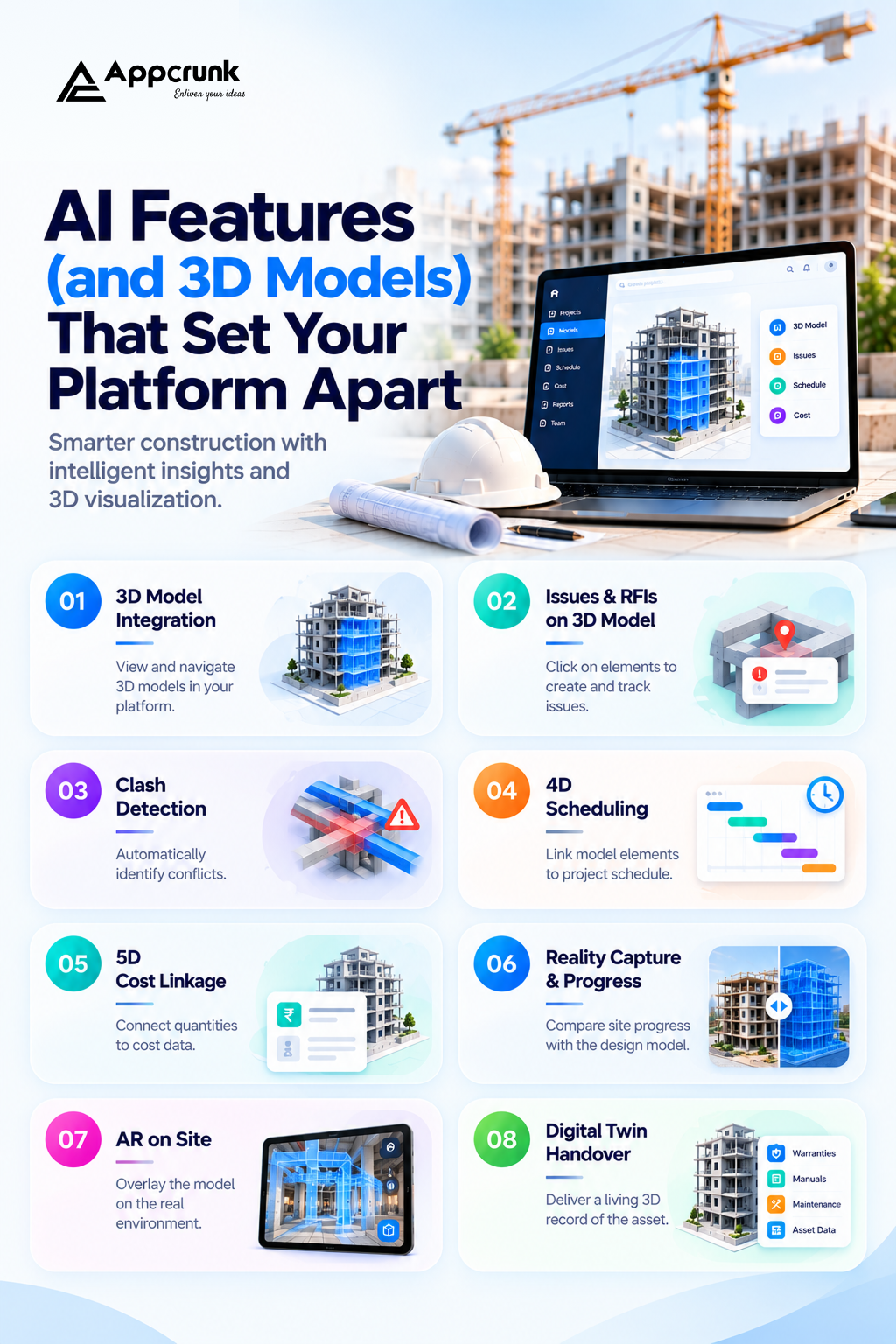
Core features get you into the market. Intelligence and 3D visualization help you win it.
1. 3D Model and BIM Integration
Building Information Modeling turns a design into a data-rich 3D model. Bringing that into your platform gives users a powerful new way to work:
• Model viewer in the browser and on mobile. Let users navigate a building in 3D without heavy desktop software, using formats such as IFC and connecting to common design tools.
• Issues and RFIs pinned to model elements. Instead of describing "the duct near the third-floor corridor," a user clicks the exact element and the issue is tied to it.
• Clash detection. Automatically flag where structural, mechanical, electrical, and plumbing elements collide before they collide on site.
• 4D scheduling. Link model elements to schedule tasks so teams can watch construction sequence unfold over time and catch logistics problems early.
• 5D cost linkage. Connect quantities in the model to cost data for faster, more accurate estimates and progress-based billing.
• Reality capture and progress comparison. Compare drone imagery, 360-degree walkthroughs, or laser scans against the design model to see what has actually been built.
• AR on site. Overlay the model on the real environment through a tablet or headset so crews can verify positions and installations.
• Digital twin handover. Deliver the owner a living 3D record of the finished asset, linked to warranties, manuals, and maintenance data. 3D capability is a major differentiator, but it also affects cost and performance, so it is usually added after the core product proves itself.
2. AI-Powered Schedule and Delay Prediction
Machine learning analyzes historical projects, current progress, weather, and resource availability to forecast delays and suggest recovery options before deadlines slip.
3. Cost Forecasting and Overrun Alerts
Models trained on your past projects can flag budget variance early and estimate final cost more accurately than manual spreadsheets.
4. Computer Vision for Progress and Safety
AI can analyze site photos and video to detect missing PPE, unsafe conditions, or work-in-place progress, and can auto-tag and organize photos by location and trade.
5. Generative AI Assistant for Documents
An assistant that answers questions across drawings, specifications, contracts, and RFIs saves hours of searching. It can summarize meeting minutes, draft RFI responses, and highlight risky contract clauses for human review.
6. Automated Takeoff and Estimating
AI can extract quantities from plans and models, speeding up preconstruction and reducing human error.
7. Smart Risk and Compliance Monitoring
Automated checks compare submittals, permits, and inspection records against requirements, alerting managers when something is missing or expired. Design note: Keep a human in the approval loop. AI should recommend and flag; qualified professionals should approve anything with safety, legal, or financial consequences.
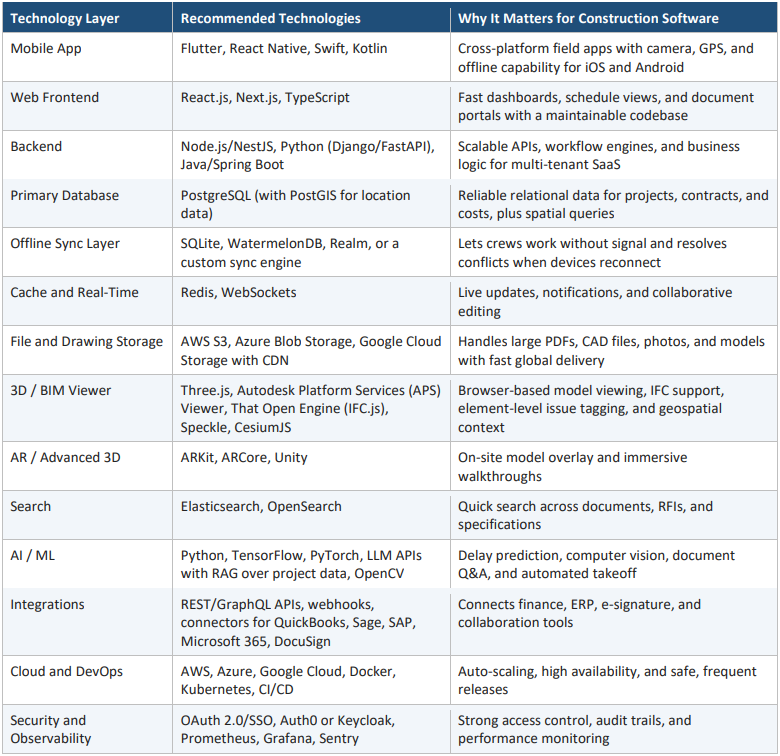
Best Tech Stack for Construction Software Development in 2026
The right stack balances offline reliability, large-file handling, real-time collaboration, and, if you include BIM, 3D rendering performance.
How Much Does Construction Project Management Software Development Cost?
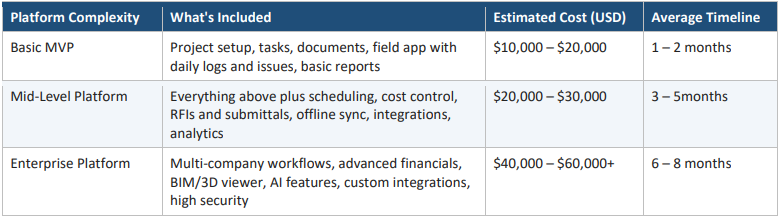
The cost depends on scope, the number of modules, how deep the 3D and AI capabilities go, and who builds it. As a broad planning guide, a focused MVP can start in the low tens of thousands of dollars, while a full enterprise platform with BIM and AI can reach several hundred thousand.
Note: The figures below are indicative ranges for planning. Actual quotes depend on your requirements, team location, and integrations.
Estimated Development Cost by Complexity
Estimated Cost by Module
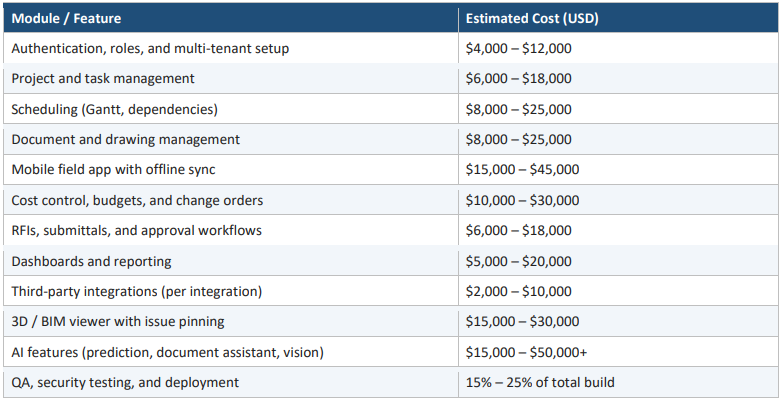
Add roughly 15% – 20% of the initial build cost per year for maintenance, hosting, and continuous improvement.
5 Core Factors That Affect Development Cost
1. Scope of Modules and Features
Every additional module means more design, development, and testing. The fastest way to control budget is a tight MVP focused on the one workflow your users need most.
2. 3D/BIM and AI Complexity
Rendering large models smoothly, supporting multiple file formats, and training or integrating AI models require specialist engineers and more time. A simple model viewer costs far less than clash detection, 4D scheduling, and reality-capture comparison.
3. Offline Sync and Performance Requirements
True offline-first design with conflict resolution is one of the hardest parts of construction software. It adds cost, but it is what makes the product usable on real sites.
4. Third-Party Integrations
Accounting, ERP, e-signature, and design-tool integrations each require setup, testing, and ongoing maintenance as external APIs change.
5. Team Location and Expertise
Development rates vary widely across regions, and experience matters. A team that has built documentheavy, multi-tenant, or 3D platforms before will avoid costly rework, even if the hourly rate is higher.
How Does Construction Software Make Money?
If you are building a product for the market, plan monetization alongside the features.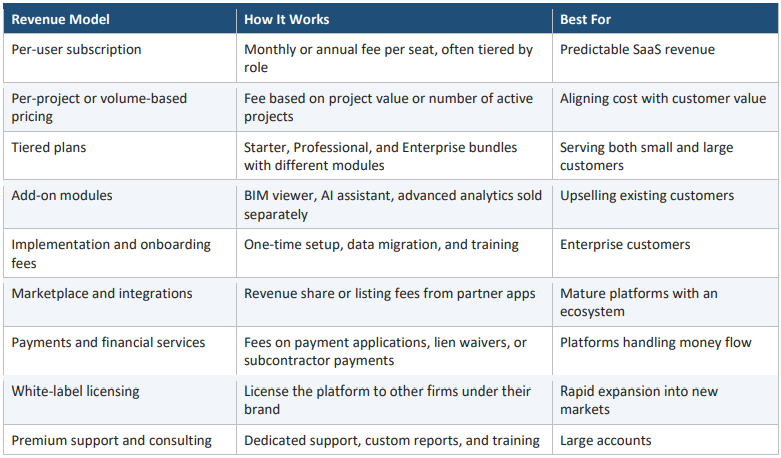
The strongest platforms combine a recurring subscription base with usage-based or add-on revenue that
grows as customers get more value.
What Makes Appcrunk the Right Choice for Your Construction Software Development?
Your technology partner shapes more than your launch date. It influences product quality, adoption on site, scalability, and how easily you can evolve the platform later. At Appcrunk, we begin with your business goals rather than a fixed template. Some clients need a lean field app to prove a concept quickly. Others need a complete, multi-company platform with 3D and AI capabilities. We recommend the path that fits the goal in front of us.
What you can expect when you build with us:
• Discovery grounded in real workflows. We map how your teams work on site and in the office before designing anything.
• Offline-first mobile engineering. Apps built for the conditions your crews actually work in.
• Scalable architecture. Multi-tenant, secure, and ready to grow from one project to thousands.
• 3D, BIM, and AI expertise. From model viewers and issue tagging to predictive analytics and document intelligence.
• Integration experience. Connections to your accounting, ERP, and collaboration tools.
• Transparent communication and rigorous QA. Clear milestones, honest estimates, and thorough testing.
• Support after launch. Ongoing maintenance, monitoring, and feature development.
Whether you want to digitize your own operations or launch a construction SaaS product, we help you build with long-term growth in mind.
Ready to plan your construction platform? Talk to the Appcrunk team for a free consultation and project roadmap.
Frequently Asked Questions (FAQs)
Q1. What is construction project management software?
It is a digital platform that helps contractors, owners, and project teams plan, track, and control construction projects. It typically manages schedules, budgets, documents, field activity, communication, and reporting in one place.
Q2. Which construction project management software is best in 2026?
It depends on your size and workflow. Procore and Oracle's tools suit large, complex portfolios. Autodesk Construction Cloud suits model-centric teams. Buildertrend suits residential builders, and Fieldwire suits field-first teams. Evaluate against your real workflows through a pilot.
Q3. Should I buy existing software or build my own?
Buy when your needs are standard and speed matters. Build when your workflow is a competitive advantage, you need data ownership, licensing costs scale badly, or you plan to sell the software as a product. Many firms combine both.
Q4. How much does it cost to build construction project management software?
A basic MVP often falls between $25,000 and $60,000, mid-level platforms between $60,000 and $150,000, and enterprise platforms with BIM and AI from $150,000 to $400,000 or more. Exact cost depends on features, integrations, and team.
Q5. How long does development take?
An MVP typically takes three to four months, a mid-level platform five to eight months, and an enterprise platform nine months or longer.
Q6. Can the software work without an internet connection?
Yes, if it is built offline-first. The mobile app stores data locally and syncs automatically, with conflict resolution, when connectivity returns. This is essential for basements, tunnels, and remote sites.
Q7. What role does 3D or BIM play in construction software?
It lets teams view the building model, attach issues and RFIs to exact elements, detect clashes, link schedule and cost to the model, and compare progress with the design. It reduces rework and misunderstandings.
Q8. How does AI help in construction project management?
AI can predict delays and cost overruns, analyze site photos for safety and progress, answer questions across project documents, and speed up takeoff and estimating. Humans should still approve critical decisions.
Q9. How do I ensure my team actually adopts the software?
Design around site workflows, keep field tasks to a few taps, support offline use, pilot on a real project, and train users early. Adoption should be measured from the first release.
Q10. Is construction software secure enough for sensitive contracts and financial data?
It can be, when built with role-based access, encryption in transit and at rest, audit logs, SSO, regular security testing, and compliance with relevant regulations.
Planning your own construction platform? Share your requirements with us and get a free project roadmap and estimate.
Construction Project Management Software in 2026 Top Solutions & How to Build Your Own
Why We Build Sport-Club Apps Differently From Court to Code
How AI Agents Are Starting to Trade Crypto Autonomously And What That Means for Investors
Generative vs Agentic AI The Next Evolution in AI Technology
How a Fintech App Development Company Can Boost Your Business Growth
Build Smart Taxi Apps Using AI Technology
How AI Is Changing Healthcare App Development
Why AI Matters in Grocery App Development
How AI Improves Real Estate Mobile Apps
Innovative AI Fitness App Development Solutions
Fintech App Development with Advanced AI Solutions
Custom OTT App Development with AI for Entertainment Platforms
Grocery Delivery App Development Solutions with AI
Home Services App Development with Intelligent AI Features
Next Generation Taxi and Transportation Apps Powered by AI
Transforming Travel Experiences with AI-Driven Hotel and Tourism Apps
AI-Driven Fitness App Development for Smart Wellness
E-Commerce App Development Using AI Technology
Smart Real Estate App Development Using AI
Smart eLearning App Development Services with AI Features
AI Healthcare Solutions Transforming Medical Services
Building Smart and Secure Social Media Apps with AI
Food Delivery Apps with Intelligent AI Features
AI-Enhanced Dating Applications The Future of Intelligent and Significant Connections
Adobe Joins Forces With ChatGPT A New Era of AI-Powered Creativity
How We Recovered from a Server Compromise RondoDox Botnet Crypto Mining Malware the React CVE-2025-55182-66478 Exploit
Boost Your Coffee Shop App with These Must-Have Features
Must-Have Features in Your Food Delivery App for 2025 Enhancing User Experience and Efficiency
Flutter vs React Native
Mobile App Security
Challenges in Mobile Application Development


Founded in 2018, Appcrunk Technologies specializes in AI-powered mobile and web development. Our skilled team transforms ideas into smart digital products by combining innovation, creativity, and the latest technologies to deliver impactful results.
Copyright © Appcrunk 2026


