The Problem That's Forcing Sports Clubs Online
Walk into almost any local sports club today — a football academy, a tennis club, abasketball league, a community swim squad — and you'll find the same three tools running the entire operation: a WhatsApp group, a shared spreadsheet, and a cash box. A coach posts "court free at 6pm, who's in?" and waits for replies. A parent pays membership fees in cash because there's no other option. A member shows up to a "confirmed" slot only to find someone else already booked it.
This works when a club has 15 members. It collapses at 100.
The pain points are consistent across every sport:
1. Double bookings and no-shows because there's no real-time view of court, pitch, or lane availability
2. Manual payment collection that eats hours and leaves no audit trail
3. No easy way to find a game — players want to play, but coordinating a partner or a fourth player still happens over group chat
4. Zero performance history — a season's worth of stats, lap times, or match results, gone the moment the WhatsApp thread scrolls past them
5. Admin burnout — club secretaries and coaches spending more hours on scheduling than on actual coaching
This is exactly the gap an on-demand sports app is built to close — and it's why demand for this category of software isn't slowing down. Independent market research places the global sports club management software market at roughly USD 13.06 billion in 2026, growing at a compound annual rate above 14% toward nearly USD 45 billion by 2035, with membership management, billing, and scheduling alone accounting for close to half of all platforms.
What Is an On-Demand Sports App — and How Does It Cover Every Sport?
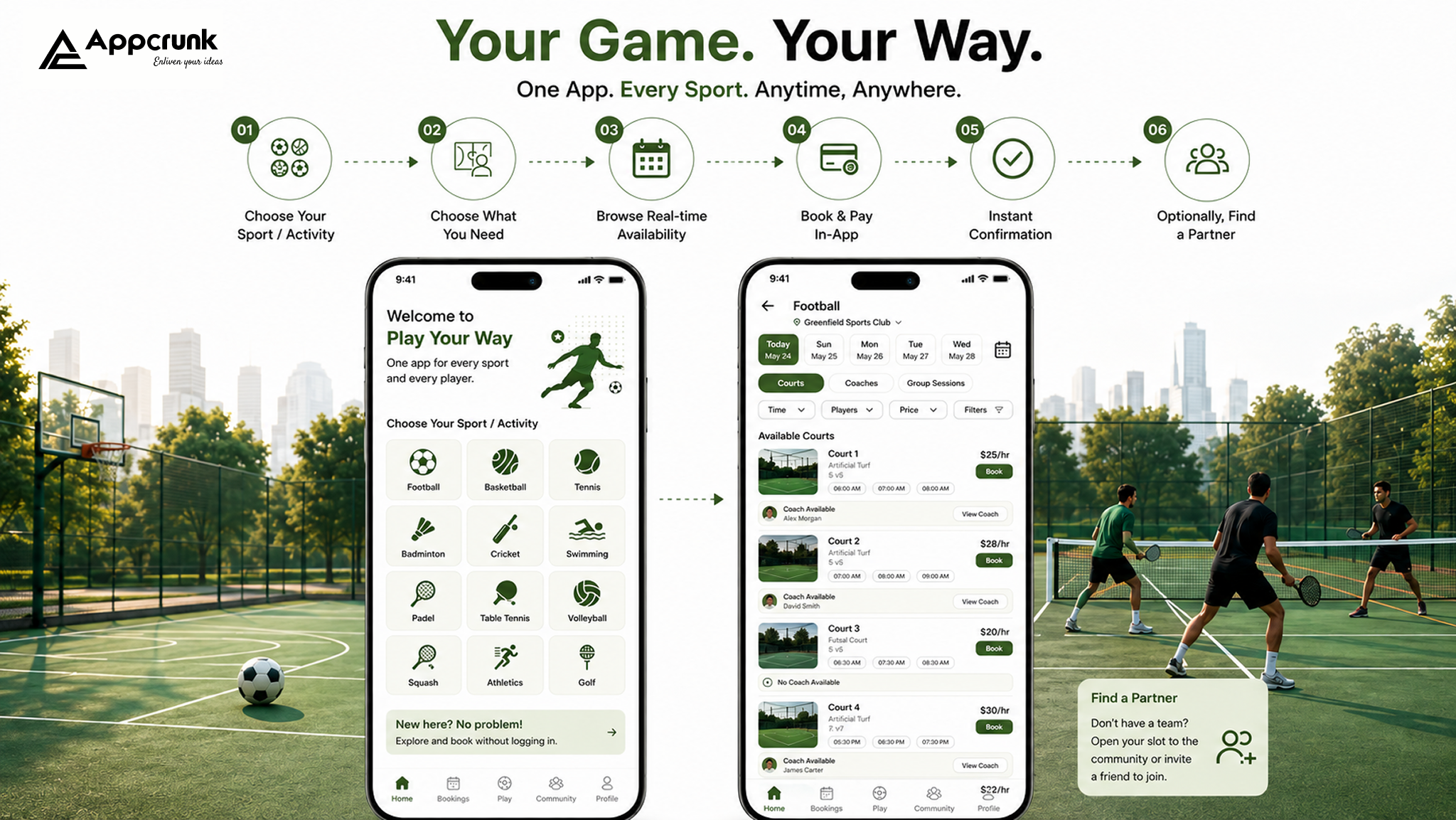
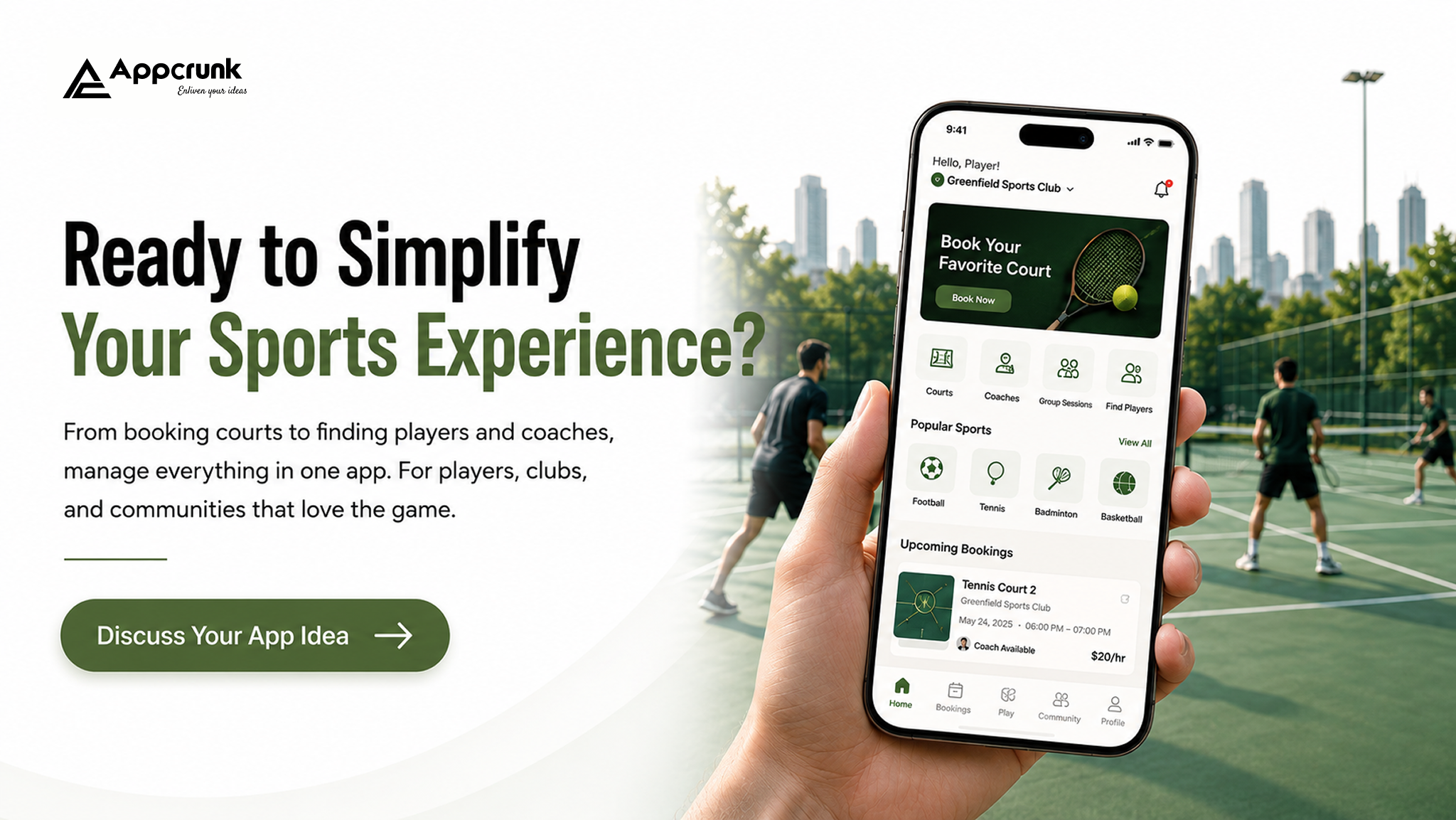
An on-demand sports app is a single platform that lets a player do three things in a few taps: pick a sport, find a slot (court, pitch, lane, or coach), and book it — with payment, confirmation, and reminders handled automatically. The best ones go one step further and let a player find people to play with, not just a place to play. The way we design this to work across every sport — football, basketball, tennis, badminton, swimming, cricket, and beyond — is through a sport-selector interface as the very first screen a user sees:
1. Choose your sport/activity from a home-screen grid (football, tennis, swimming, basketball, etc.)
2. Choose what you need — a court/pitch/lane, a coach, or a group session
3. Browse real-time availability filtered by location, time, and price
4. Book and pay in-app, with instant confirmation
5. Optionally, find a partner — invite a friend directly, or open the slot to the club/community for someone else to join
That last step is what turns a booking app into a genuinely social sports platform: a tennis player with an empty second slot can either message a specific friend or list it as "open" so any verified nearby player at a similar skill level can join. The same logic works for a five-a-side football game between two players, or a swim lane someone wants to share.
Because the sport-selector sits at the top of the architecture and everything downstream (booking rules, panel logic, session types) is modular, the same app can serve a single-sport club or a multi-sport facility without being rebuilt for each one.
How Does an On-Demand Sports App Actually Work?
Behind that simple front-end flow, four systems are working together in real time:
1. Inventory engine — tracks live availability of every court, pitch, lane, and coach slot, and locks a slot the instant it's selected to prevent double booking.
2. Matching engine — for the "find a partner/stranger" feature, matches players by sport, skill level, location, and time window.
3. Payment engine — handles the transaction (full payment, split payment among players, or subscription billing) and releases the booking only once payment clears.
4. Notification engine — pushes confirmations, reminders, weather-related reschedule alerts, and coach/admin updates in real time.
This is the same basic architecture whether the app is a single-club tool or a city-wide multi-venue platform — only the scale of the inventory changes
Types of Business Models for Sports Apps


Traditional Sports Apps vs. On-Demand Platforms

The two features that separate a genuinely modern platform from a digitized version of the old system are Al-assisted recommendations (suggesting a court, coach, or playing partner based on history and preferences) and the selective-partner feature — the ability to choose exactly who joins your game, whether that's a specific friend or a vetted stranger matched by skill level.
Must-Have Features
1. Sport selector / multi-activity home screen
2 .Real-time court, pitch, lane, and coach booking
3. In-app payments with split-payment support
4. Player/partner-matching (friend invite or open-to-community)
5. Push notifications (confirmations, reminders, cancellations)
6. Ratings and reviews (venues, coaches, players)
7. Membership and subscription management
8. Basic performance/attendance tracking
9. In-app chat between players, coaches, and admins
10 .Admin dashboard for scheduling and revenue oversight
Types of Panels — and Why Each One Matters
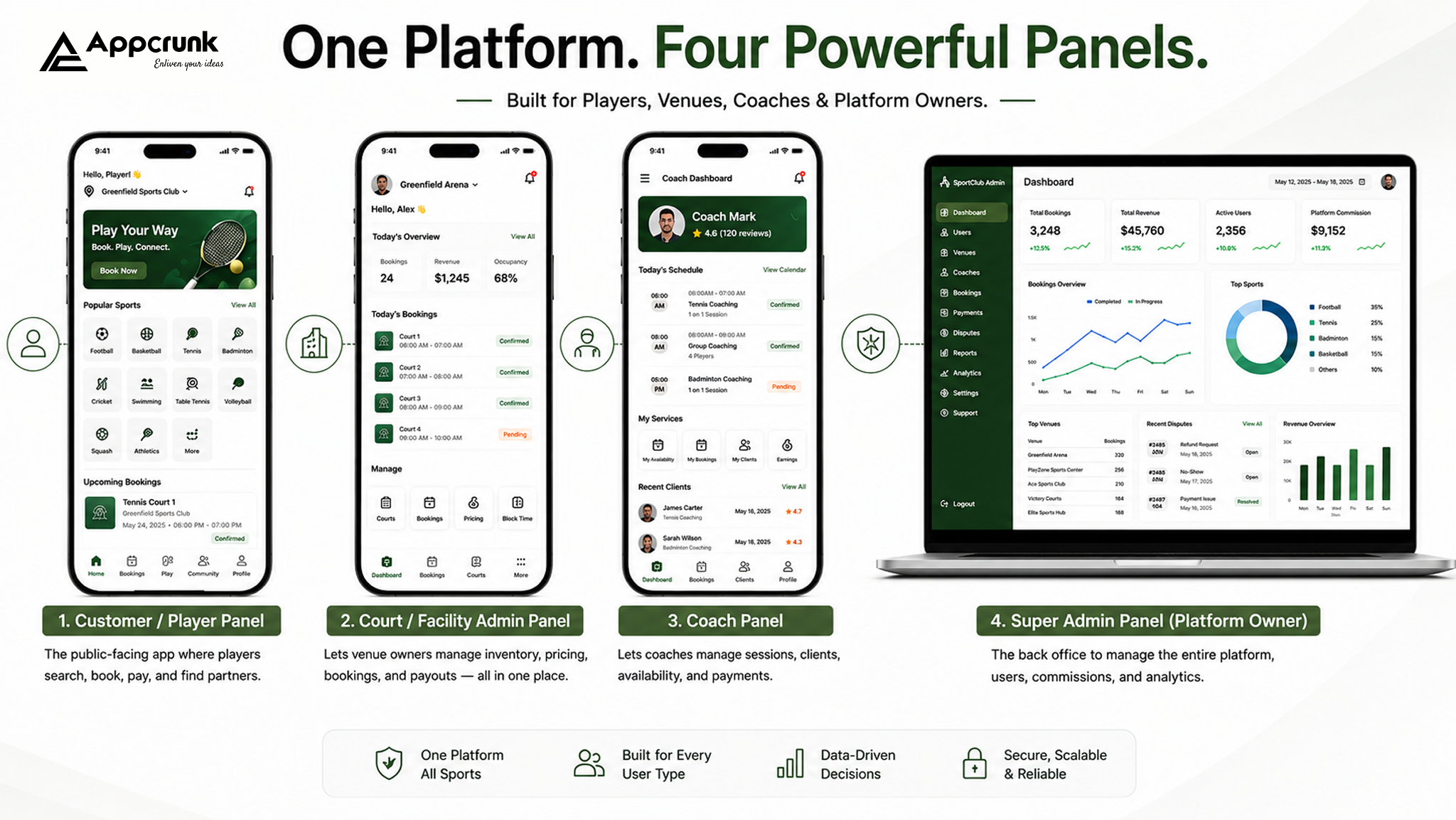
A sports app isn't one interface — it's several, built for different jobs:
1. Customer / Player Panel The public-facing app where players search, book, pay, and find partners. This panel matters
most for growth — it's the one that determines whether people keep opening the app.
2. Court / Facility Admin Panel Lets venue owners manage their own inventory — set pricing, block out maintenance hours, view bookings, and reconcile payouts. Without this, every schedule change requires a support ticket, which doesn't scale past a handful of venues.
3. Coach Panel Lets coaches manage their own availability, accept or decline session requests, track client progress, and get paid directly. This matters because coaches are often the reason players stay loyal to a platform — giving them ownership of their own calendar keeps them actively using it.
4, Players / Members Panel (club-specific) For club members specifically — separate from the general public booking flow — showing membership status, team/league standing, attendance history, and club announcements.
This matters because a paying club member expects a different, more personalized experience than a one-off visitor booking a single court.
5. Super Admin Panel (platform owner)
The back office — managing commissions, disputes, verified accounts, and platform-wide analytics across every venue, coach, and club on the platform.
Each panel exists because each user type is solving a different problem with the app — collapsing them into one generic interface is one of the most common reasons club-management tools feel clunky.
Advanced Features That Set an App Apart
1. Al-based partner and coach matching — recommending playing partners or coaches based on skill level, past bookings, and availability patterns, not just a manual search
2. Play-with-a-stranger mode — open slots to a vetted community of nearby players when a friend isn't available
3. Dynamic/surge pricing — adjusting court or coach pricing based on demand, similar to ride-hailing
4. Weather-aware auto-rescheduling — automatic alerts and one-tap rebooking for outdoor sports
5. Wearable integration — pulling heart rate, distance, or lap splits from fitness trackers into a player's profile
6. Gamification — streaks, badges, and club leaderboards that work across different sports without needing a shared scoring system
7. Video/performance analytics — basic match or session clips tied to a player's stats history
8. Local marketplace — sponsor deals, gear discounts, or nutrition partners layered
into the app
9. Multi-language and multi-currency support — essential for platforms expanding beyond one city or country
Regulatory & Compliance Requirements
Building a payment-and-booking platform means compliance isn't optional:
1. Payment security (PCI-DSS) — any app handling card data directly must meet PCI-DSS standards, or route payments through a certified processor (Stripe, Razorpay, etc.) to offload that liability
2. Data privacy (GDPR, CCPA, or local equivalents) — especially relevant given the app stores minors' data in youth sports contexts, requiring parental consent flows
3. Child safety & verification — background-check requirements for coaches working with minors vary by region and are often legally mandated
4. Cancellation & refund policy disclosure — many regions require clear, accessible terms for booking cancellations
5. Accessibility compliance (WCAG) — increasingly expected, and in some regions legally required for public-facing booking platforms
6. Local business licensing — facility aggregation may require specific business registration depending on the country/state
None of this is a one-time checklist — it needs to be revisited every time the app expands into a new region or adds a new payment method.
How to Build a Sports App: Step-by-Step Process
1. Market Research
Study existing players in your target market/sport, identify gaps (a city with no cross-sport booking app, or a sport with no dedicated coach-matching platform), and validate demand directly with clubs and players before writing a spec.
2. Define Your Business Model
Pick from the models above — aggregator, single-club, subscription, marketplace, or hybrid — since this decision shapes almost every technical and design choice that follows.
3. List Your Features
Separate must-have (MVP) features from advanced features you'll add post-launch. Trying to launch with everything at once is the single most common reason sports-app timelines and budgets blow out.
4. Decide Your Tech Stack
Choose based on your team's expertise, expected scale, and how much real-time functionality you need (see the tech stack section below).
5. Design UI/UX
Wireframe the sport-selector flow first, since it's the entry point every user passes through. Design for one-handed, outdoor, patchy-connectivity use — that's the real-world context most sports apps are opened in.
6. Development
Build backend services (booking engine, payments, matching) and front-end apps in parallel sprints, typically starting with one sport fully functional before expanding the sport-selector to others.
7. Testing
Beyond standard QA, run load tests simulating dozens of users booking the same slot simultaneously — this is where most booking-engine bugs actually surface.
8. Launch
Soft-launch with one or two real clubs before a public rollout, so early bugs surface with a forgiving, invested user base rather than the general public.
9. Post-Launch Maintenance
Ongoing bug fixes, seasonal feature updates (new sports, new regions), server scaling, and — critically — monitoring payment and compliance changes as the app grows.
Choosing the Right Tech Stack — and Why It's Non-Negotiable
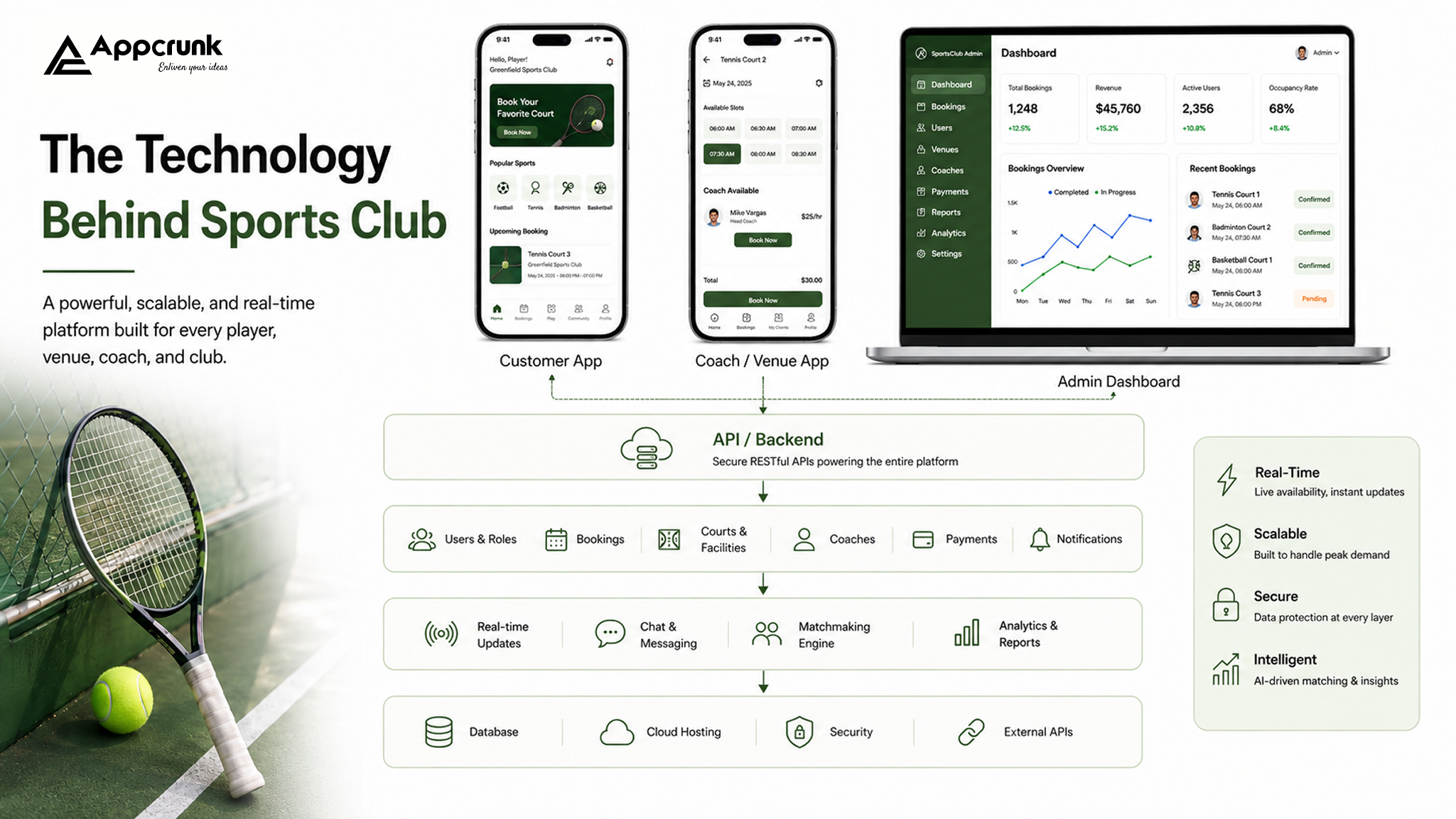
The tech stack isn't a background decision — it directly determines whether real-time booking actually works. A stack that can't handle concurrent writes will double-book courts under real load; a stack without a strong caching layer will feel sluggish exactly when players are trying to grab a popular evening slot. Getting this right early avoids a costly rebuild later.

Breakdown of Cost to Build a Sports App

Actual cost within each tier depends on team location, platform count (iOS + Android + web), and how many third-party integrations (payment gateways, wearables, ML services) are included.
How to Choose the Right Development Partner
1. Ask for sports-domain experience specifically — a team that's only built e-commerce apps will underestimate the complexity of real-time slot locking and seasonal scheduling
2. Check their approach to scalability — ask directly how they'd handle 500 simultaneous bookings during a popular Saturday evening window
3. Review their post-launch support model — sports apps need ongoing seasonal updates (new sports, new leagues, new compliance requirements), not just a one-time build
4. Look for modular/architecture-first thinking — a partner who proposes a single rigid app for “your sport” instead of a flexible core is planning for a rebuild later
5. Verify compliance familiarity — especially payment security and child-safety verification if the platform serves youth sports
Challenges in Sports App Development — and How to Solve Them
1. Double bookings under high concurrency — solved with proper slot-locking logic (Redis-based locks) rather than relying on database writes alone
2. Low initial liquidity (not enough players/coaches to make matching useful) — solved by launching hyper-local, with one or two well-established clubs, before expanding city-wide
3. Payment disputes and no-shows — solved with clear cancellation policies enforced in-app, and optional deposit-holds for high-demand slots
4. Balancing simplicity with multi-sport flexibility — solved by keeping the sport-selector and core booking flow identical across sports, with sport-specific differences handled in configuration, not separate UI flows
5. Coach and venue onboarding friction — solved with a dedicated onboarding flow and panel that gets a coach's calendar live in minutes, not days
6. Retaining users after the first booking — solved with the social/matchmaking layer — an app used purely for booking is easy to abandon; one used to find games and partners builds a habit
Conclusion
An on-demand sports app isn't really about digitizing a booking calendar — it's about removing every piece of friction between someone wanting to play and actually playing, whether that's finding a court, a coach, or a partner to share the game with. Built on a modular, multi-sport foundation, the same platform that works for a football club on Monday can power a swim squad on Tuesday — without either one feeling like an afterthought. That's the difference between an app a club tolerates and one it genuinely grows with.
Frequently Asked Questions (FAQs)
Can one app really support multiple sports well, or is that always a compromise?
It works well when the architecture is modular from the start — a shared booking/payment/matching core with sport-specific rules layered on top, rather than one rigid template forced across every sport.
What's the minimum viable version of a sports app worth launching with?
A single-sport MVP with real-time booking, payments, and basic admin controls — matchmaking, multi-sport support, and advanced features are best added once the core booking flow is proven with real users.
How long does it typically take to build?
A Basic MVP generally takes 3-4 months; a mid-level build 5—7 months; an advanced, multi-sport platform with Al matching can take 8-12 months.
Is the “play with a stranger” feature safe to build?
Yes, with the right safeguards — verified profiles, ratings/reviews, and optional ID verification for high-trust categories like youth coaching sessions.
Do I need a different app for facility owners versus players?
Not necessarily a different app, but definitely a different panel — bundling admin and player experiences into one interface is one of the most common causes of a clunky user experience.
Whether you're building for one club or a city-wide network of sports, the platform underneath should be flexible enough to grow with every sport you add — not rebuilt every time you do.
Written by Kirat Kaur
Construction Project Management Software in 2026 Top Solutions & How to Build Your Own
How AI Agents Are Starting to Trade Crypto Autonomously And What That Means for Investors
Generative vs Agentic AI The Next Evolution in AI Technology
How a Fintech App Development Company Can Boost Your Business Growth
Build Smart Taxi Apps Using AI Technology
How AI Is Changing Healthcare App Development
Why AI Matters in Grocery App Development
How AI Improves Real Estate Mobile Apps
Innovative AI Fitness App Development Solutions
Fintech App Development with Advanced AI Solutions
Custom OTT App Development with AI for Entertainment Platforms
Grocery Delivery App Development Solutions with AI
Home Services App Development with Intelligent AI Features
Next Generation Taxi and Transportation Apps Powered by AI
Transforming Travel Experiences with AI-Driven Hotel and Tourism Apps
AI-Driven Fitness App Development for Smart Wellness
E-Commerce App Development Using AI Technology
Smart Real Estate App Development Using AI
Smart eLearning App Development Services with AI Features
AI Healthcare Solutions Transforming Medical Services
Building Smart and Secure Social Media Apps with AI
Food Delivery Apps with Intelligent AI Features
AI-Enhanced Dating Applications The Future of Intelligent and Significant Connections
Adobe Joins Forces With ChatGPT A New Era of AI-Powered Creativity
How We Recovered from a Server Compromise RondoDox Botnet Crypto Mining Malware the React CVE-2025-55182-66478 Exploit
Boost Your Coffee Shop App with These Must-Have Features
Must-Have Features in Your Food Delivery App for 2025 Enhancing User Experience and Efficiency
Flutter vs React Native
Mobile App Security
Challenges in Mobile Application Development


Founded in 2018, Appcrunk Technologies specializes in AI-powered mobile and web development. Our skilled team transforms ideas into smart digital products by combining innovation, creativity, and the latest technologies to deliver impactful results.
Copyright © Appcrunk 2026


